Path Finder alternatives for Mac in 2026
Path Finder is now sold by the year. If you would rather pay once, or want something different, here are the Mac file managers worth trying, with prices checked.
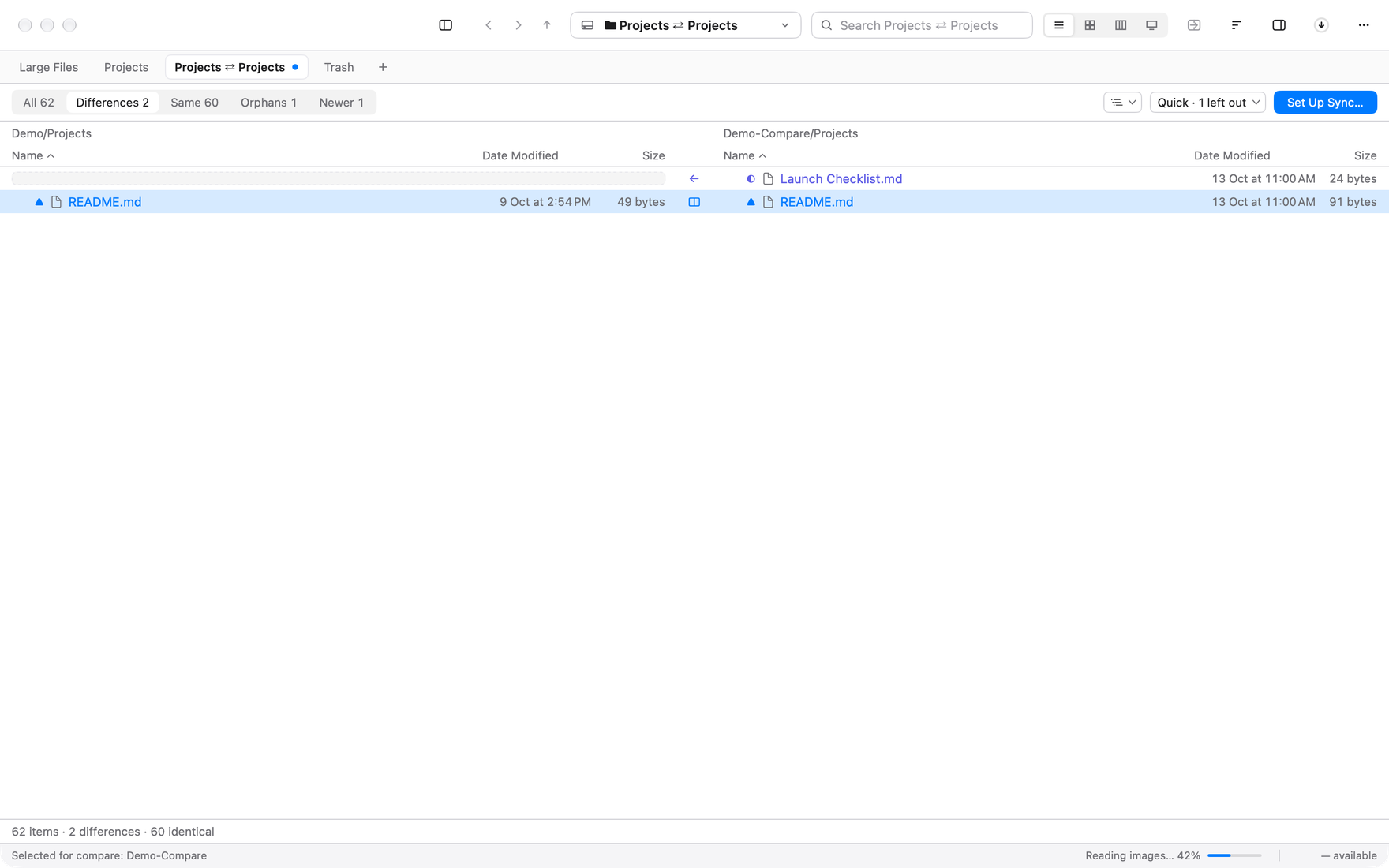
The short answer: if you want a Path Finder alternative you pay for once, try Branchway. It has two or more panes, folder compare with sync, batch rename, its own search index of every drive and a map of what fills each disk. It is $19 once at launch for one Mac, and the trial is 14 days. ForkLift is the pick for heavy server work, and Commander One or Nimble Commander if you want a free two-panel app.
Branchway is ours. Path Finder facts below were checked on 2 November 2026, and the other apps’ prices on 21 October 2026.
Why do people look for a Path Finder alternative?
Path Finder from Cocoatech has been around for a long time, and it is still sold and updated. Version 26 came out in May 2026, and TidBITS reported 26.1.6 in July. It is a deep app: dual pane, tabs, folder compare and sync, a built-in terminal, a hex editor and the Drop Stack shelf. People who rely on it tend to rely on a lot of it.
The usual reasons to look elsewhere are practical:
- The price is time-limited. Path Finder is not a one-time purchase. Cocoatech offers a yearly subscription at $29.95 that renews, and licences for one year ($32.95), two years ($55.95) or five years ($122.95). It is also in Setapp.
- Version 26 needs a newer macOS. Cocoatech’s support page lists macOS 13 Ventura or later for Path Finder 26.
- You use a few features, not all of them. If you mostly use dual pane, compare and batch rename, a smaller app can cover that.
If Path Finder does what you need and the price works for you, keep it. Every app below runs next to Finder, and next to Path Finder too, so you can try one without giving anything up.
Which Path Finder alternatives are worth trying?
1. Branchway
Branchway is a native Mac file manager. Like Path Finder, it has dual pane, folder compare and batch rename. It also has its own search index and a map of each disk.
Panes. Press ⌥⌘2 for two panes, or split again for up to four in a tab. Each pane has its own path and history. Drag between them, or use Copy to Other Pane. The Commander keyboard profile gives you F5 to copy and F6 to move. More in how to get a dual-pane file manager on a Mac.
Folder compare and sync. Compare two folders, filter to Differences, Same, Orphans or Newer, step through each difference and open two text files side by side. Set Up Sync copies newer and missing files one way or both, with a preview first. See how to compare two folders on a Mac.
Batch rename. Replace text, add text, or rename to a name and a number or date, with a preview of every new name before anything changes. See how to batch rename files on a Mac.
Search. Branchway keeps its own index of file names on every drive, external ones included, and merges in Spotlight when it is on. Press ⌘K and type “pdfs over 1 mb from last week” and it turns that into filters.
Storage. A map of each drive, coloured by kind of file, and a Large Files list with a review tray, so nothing moves until you confirm.
Also: a duplicate finder that compares content, SMB and WebDAV shares, SFTP, S3 and Azure folders, zip, tar and 7z archives opened in place, a Trash that shows hidden items, and editable permissions.
- Price: $19 once at launch for one Mac ($29 regular). Every 1.x update is included.
- Needs: macOS 14 or later.
- Trial: 14 days with every feature. Browsing, search and preview stay free after it.
- What it doesn’t have: a built-in terminal or hex editor. Branchway opens the folder in your terminal app instead.
2. ForkLift 4
ForkLift from BinaryNights is a dual-pane file manager and a transfer client in one. It connects to a wide range of servers and cloud services and syncs folders.
- Price: $19.95 with one year of updates, or $34.95 with two. You keep the last version you were entitled to.
- Needs: macOS 14.6 or later.
- Good for: people who move files to and from servers all day.
3. Commander One
Commander One is a classic two-panel file manager with tabs and an operations queue. PRO adds server and cloud connections and phones mounted as drives.
- Price: free on the Mac App Store, PRO $29.99 once.
- Needs: macOS 10.13 or later.
- Good for: a free two-panel app, or a Mac still on an older macOS.
4. QSpace Pro
QSpace Pro shows two, three or four folders in one window, connects to servers through an extension and compares files by hash.
- Price: $29.99 once regular, often on sale. 30-day trial.
- Needs: macOS 10.15 or later.
- Good for: many folders on screen at a low price.
5. Nimble Commander
Nimble Commander is a free, open-source two-panel file manager with FTP, SFTP and WebDAV, a built-in terminal and batch rename.
- Price: free. Needs: macOS 11 or later.
- Good for: keyboard users who want the built-in terminal Path Finder had.
How do they compare with Path Finder?
| App | Price | Panes | Folder compare | Built-in terminal |
|---|---|---|---|---|
| Path Finder 26 | from $29.95 a year | Dual | Yes | Yes |
| Branchway | $19 once (launch) | 2 to 4 | Yes, with sync | No |
| ForkLift 4 | $19.95, 1 yr updates | Dual | Sync | See site |
| Commander One | Free, PRO $29.99 | Dual | See site | See site |
| QSpace Pro | $29.99 once | Up to 4 | Hash compare | See site |
| Nimble Commander | Free | Dual | See site | Yes |
“See site” means we did not confirm it on the maker’s own pages. Check before you choose.
Which one should you choose?
Start from the Path Finder features you open every week.
- Dual pane, compare, rename, search and storage, paid once: Branchway.
- Servers and cloud transfers all day: ForkLift.
- Free, or an older macOS: Commander One or Nimble Commander.
- The terminal and hex editor inside the file manager: stay with Path Finder, or try Nimble Commander for the terminal.
Most of these have a trial, so try one for a week on real work. For a wider list, read our pick of Finder alternatives. To see how Branchway sits next to Finder, read Branchway and Finder, or try Branchway free for 14 days.
Questions people ask
Is Path Finder still available?
Yes. Cocoatech still sells and updates Path Finder. The current version is numbered 26, and TidBITS reported version 26.1.6 in July 2026.
Is Path Finder a subscription?
It is sold for a period of time rather than once. Cocoatech offers a yearly subscription and licences for one, two or five years, and Path Finder is also in Setapp. Check Cocoatech's store for the current terms.
What is a good Path Finder alternative with a one-time price?
Branchway is $19 once at launch for one Mac, with every 1.x update included and a 14-day trial. Commander One PRO and QSpace Pro are also one-time purchases, and Nimble Commander and Double Commander are free.
Which Path Finder alternative has dual pane and folder compare?
Branchway has both: two or more panes in a window, and a folder compare that shows what differs and can sync the two folders. ForkLift also has dual panes and folder sync.
Which macOS version does Path Finder need?
Cocoatech's support page lists macOS 13 Ventura or later for Path Finder 26. Branchway needs macOS 14 or later.