The best Finder alternatives for Mac in 2026
Our pick of Finder alternatives for Mac in 2026, led by Branchway, with ForkLift, Commander One, Path Finder, QSpace Pro, Bloom and more.
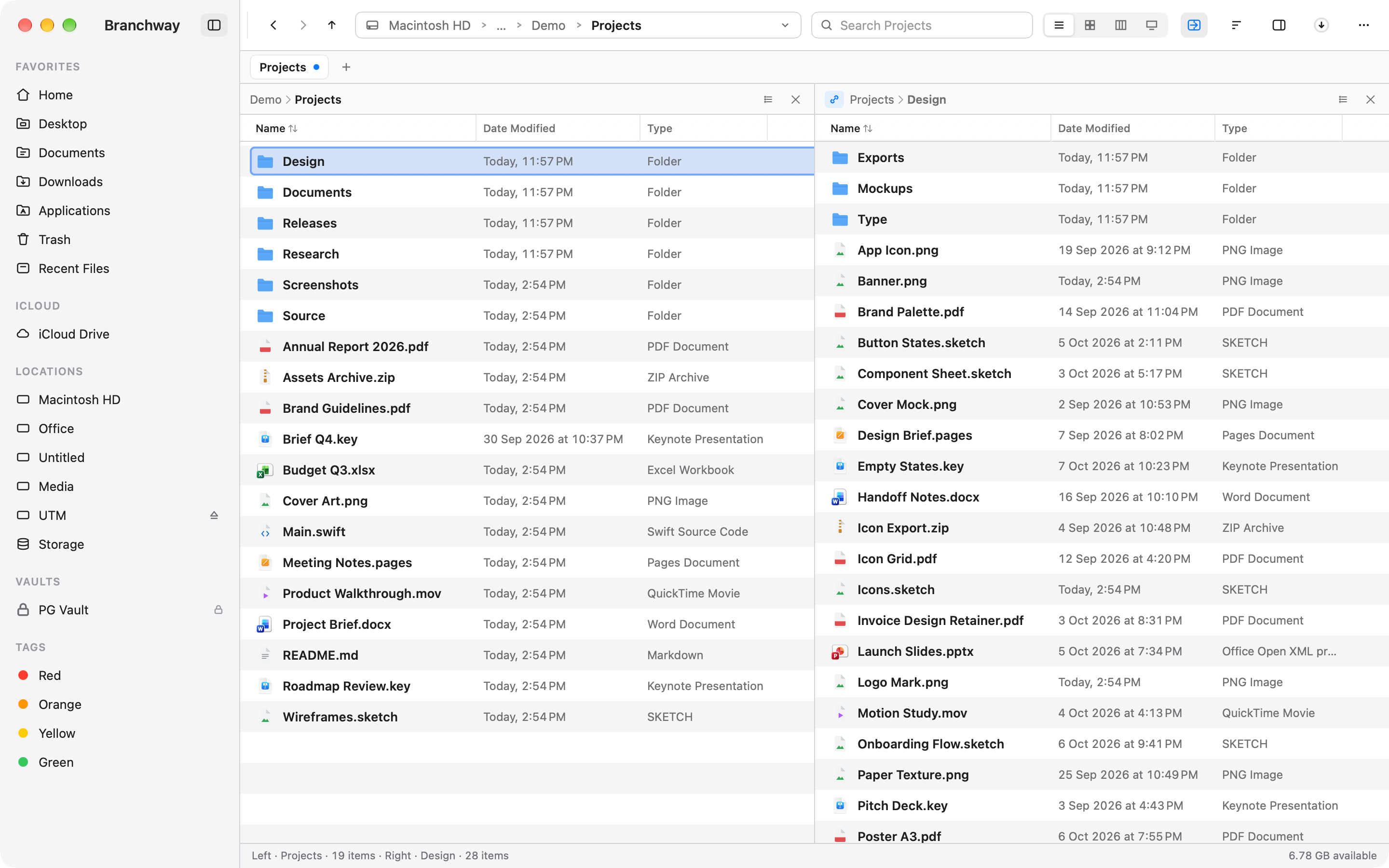
The short answer: our pick is Branchway. It finds a file from a plain sentence, finds photos by what is in them, keeps its own index of every drive, external ones included, and shows you what fills each disk, all in an app that looks and feels like it belongs on a Mac. It is one payment, $19 at launch instead of $29, and you can try Branchway free for 14 days.
The others, in a line each: ForkLift for servers and sync, Commander One and Nimble Commander as free two-panel apps, Path Finder for its long-standing toolbox, QSpace Pro and Bloom for many panes at a low price, Marta and Double Commander for people who like to configure their tools.
Branchway is ours. Every price and version below was checked on the maker’s own site on 21 October 2026.
Why look for a Finder alternative?
Finder is fine for opening a document or dragging a file onto the Desktop. The questions start when the work gets heavier:
- Two folders at once. Moving files between a source and a destination is easier when both are on screen. Finder gives you two windows, not two panes.
- Search that finds the file you remember. Finder search goes through Spotlight. When Spotlight is off, still indexing or skipping a drive, the file is not found.
- Where the space went. Finder will not show which folders are filling your disk.
- Servers and cloud storage. Finder can connect to a server, but there is no transfer queue or saved connection list worth the name.
- Keyboard work. A good file manager lets you do most things without the mouse.
If Finder covers your day, keep it. Every app here runs right beside it.
Which Finder alternatives are worth trying?
1. Branchway, our pick
Branchway is a native Mac file manager built around one idea: you should be able to find any file the way you remember it, and see at a glance what is on every drive.
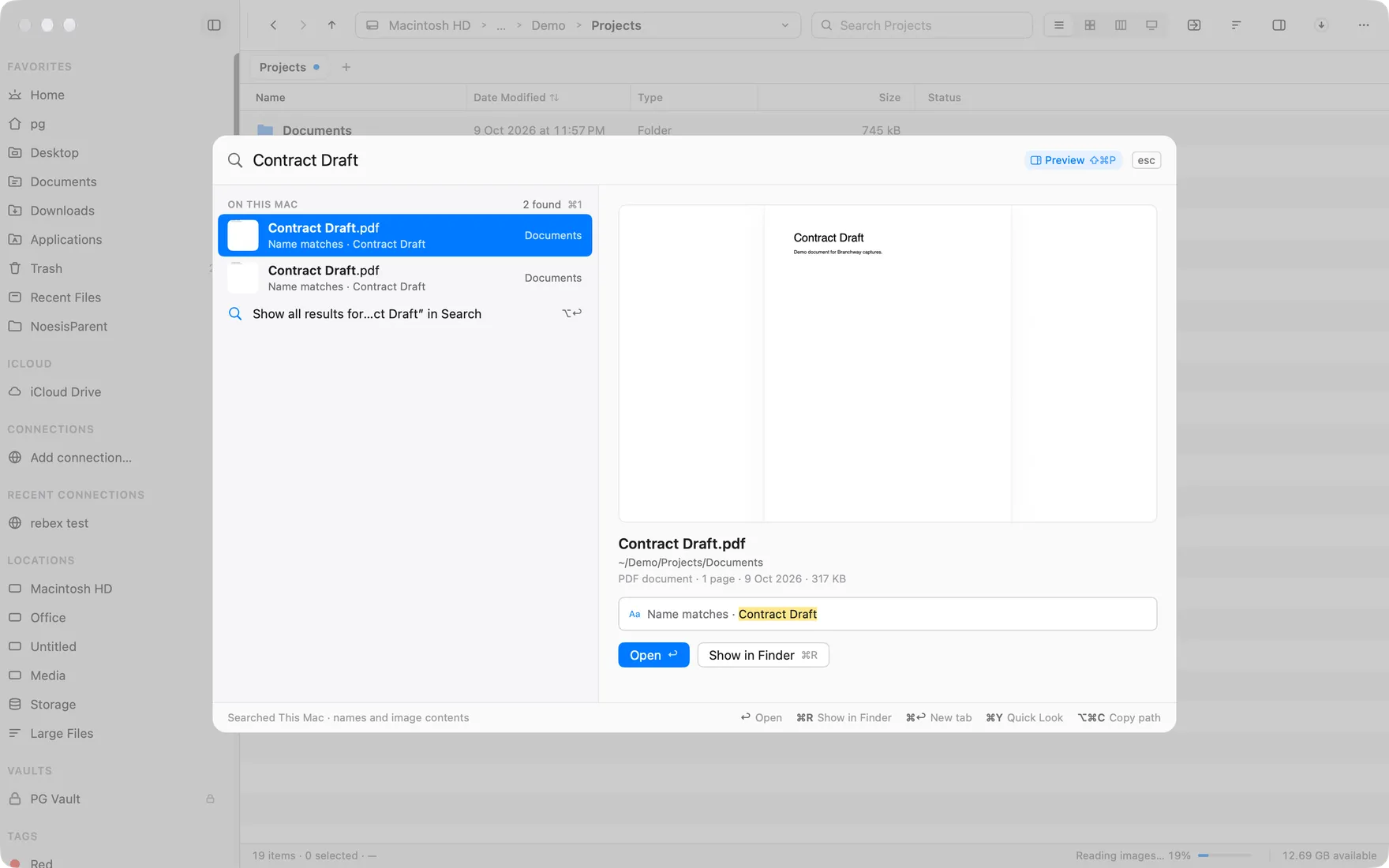
Search by sentence. Press ⌘K and type “pdfs over 1 mb from last week”. Branchway turns that into kind, size and date filters. Results come from Branchway’s own index of file names on every volume, including external drives, so they arrive as you type, with Spotlight merged in when it is on. Give the palette some room and a preview opens beside the results, with a PDF jumped to the page that matched.
Photos by what they show. Switch on image search and a search for a receipt, a beach or a whiteboard finds the picture in any folder, using the image tools built into macOS on your Mac. With the optional smart search model on Apple silicon, the same sentence also finds text inside documents and moments inside videos.
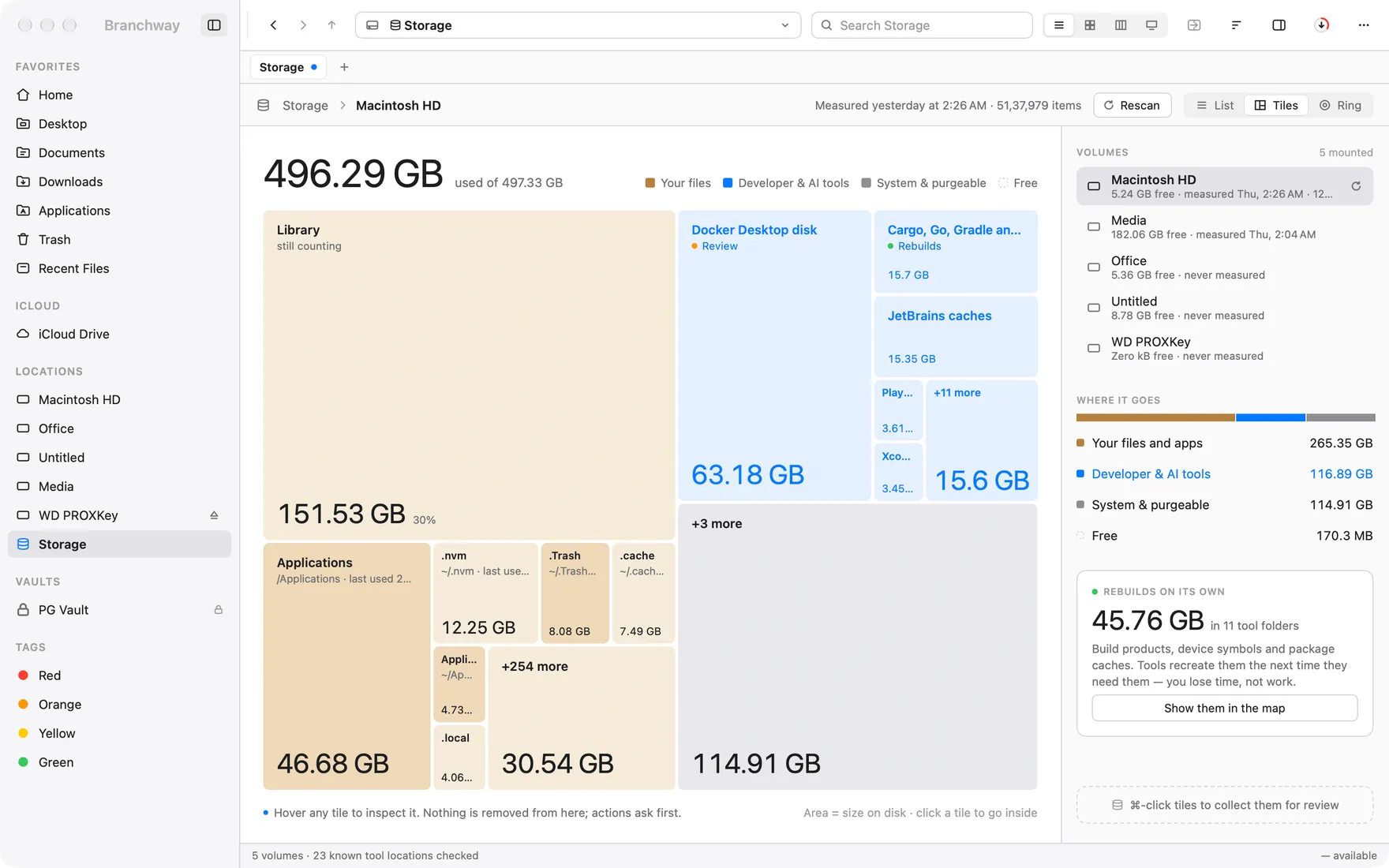
Every drive, mapped. Storage draws a map of each drive, coloured by kind of file, and Large Files lists the biggest files first, with a review tray so nothing is removed until you say so.
Two panes and more. Split a window into two or more panes, each with its own header, path and history, drag between them, and keep tabs the way you keep them in a browser.
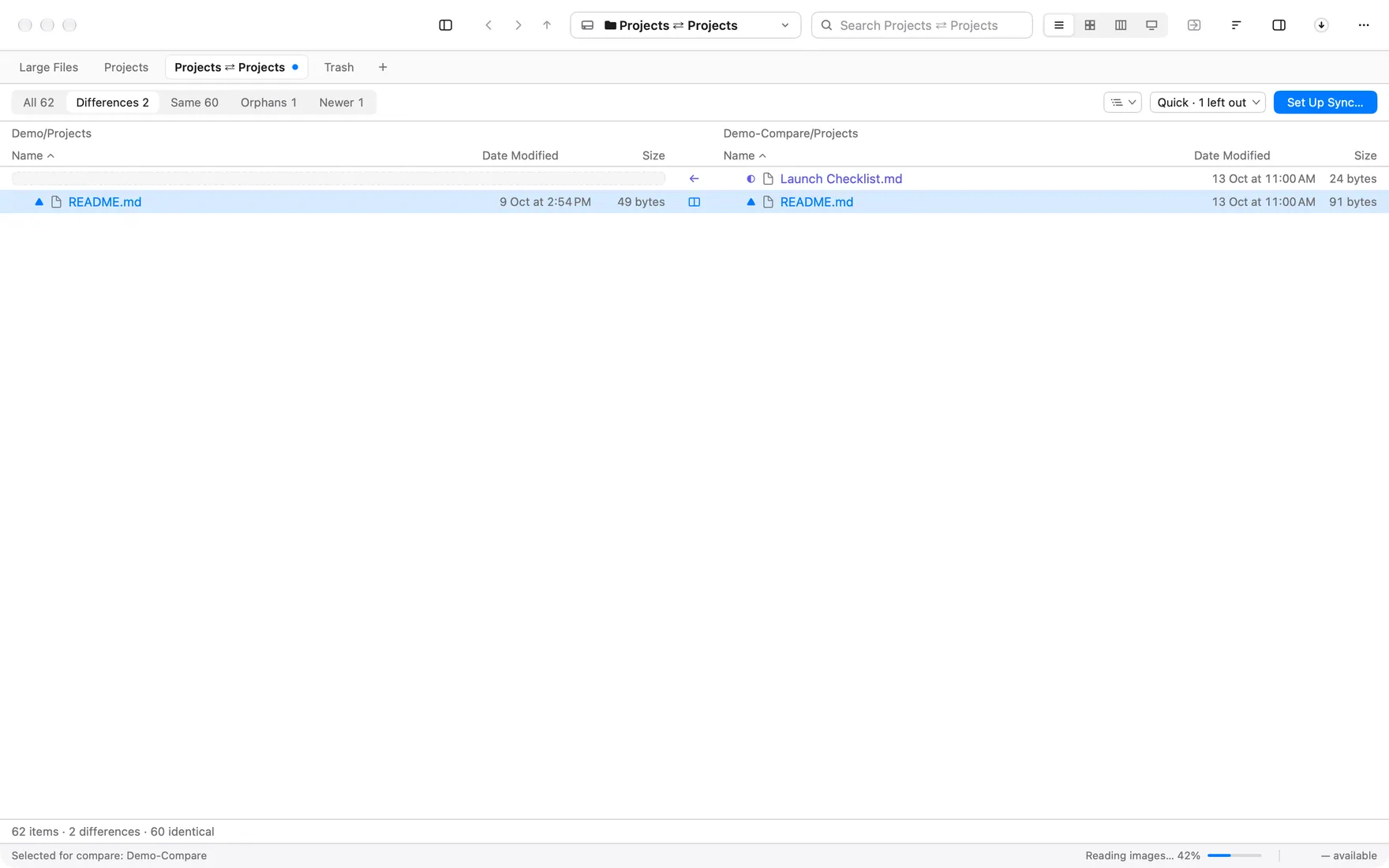
Compare two folders. See what differs between two folders, filter to differences or newer files, and step through a text diff of any file.
Everything else you reach for. Encrypted vaults that unlock with Touch ID, archives you open in place, batch rename, Git status, OneDrive, Google Drive and iCloud folders without accidental downloads, SMB and WebDAV shares, and SFTP, S3 and Azure folders with progress for every transfer.
- Price: one payment per Mac. $19 at launch, regularly $29, with every 1.x update included. The trial is 14 days with every feature and needs no account. After it, browsing, search and preview stay free. Refunds within 14 days.
- Needs: macOS 14 or later, on Apple silicon or Intel.
- Best for: anyone who has outgrown Finder, people coming from Windows who want a file manager that feels familiar and powerful, and anyone who wants two panes, plain-sentence search, a map of every disk and folder compare in one native Mac app.
Try Branchway free for 14 days.
Coming from Windows?
If you moved to a Mac from Windows, Finder is usually where you feel it most. Branchway gives you back what File Explorer and Total Commander taught your hands:
- Cut and paste. ⌘X and ⌘V move files, with progress and a sheet for name conflicts.
- A path you can type. Press ⌘L or ⇧⌘G and type or paste a path; the address bar completes it as you go.
- Tabs and two panes. ⌘T for a tab and ⌥⌘2 for a second pane, with files dragged or sent straight across.
- Your shortcuts. Pick the Windows keymap, or the Commander keymap where F5 and F6 copy and move to the other pane, and remap anything in Settings › Keyboard.
- Hidden files and extensions on show. One switch shows hidden files in every pane, and Show All lists every extension.
- Folder sizes. A Size column for folders, plus a map of what fills each disk.
- Search that finds it. One index of every drive, external ones included, with results as you type.
2. ForkLift 4
ForkLift from BinaryNights is a dual-pane file manager and a file transfer client in one app. It connects to SFTP, FTP, WebDAV, Amazon S3, Backblaze B2, Google Drive, OneDrive, Dropbox and SMB, AFP and NFS shares, and syncs folders one way or both.
- Price: single user $19.95 with one year of updates, or $34.95 with two. Family $29.95. You keep the last version you were entitled to.
- Needs: macOS 14.6 or later. Version 4.7.7 came out on 20 October 2026.
- Good for: people who move files to and from servers all day.
3. Commander One
Commander One from Electronic Team is a classic two-panel file manager with tabs, an operations queue and regular-expression search. The paid PRO version adds FTP, SFTP, WebDAV and cloud connections, more archive formats, and iPhone and Android devices mounted as drives.
- Price: free on the Mac App Store, PRO a one-time $29.99. Team licence for up to five Macs $99.99.
- Needs: macOS 10.13 or later. Version 3.18 came out on 25 September 2026.
- Good for: a free two-panel app, or reaching phones from the Mac.
4. Path Finder
Path Finder from Cocoatech is one of the oldest Finder alternatives, now at version 26. It is a deep toolbox: shelves down the side of the window, folder compare, a duplicate finder and a preview that can edit text.
- Price: a time-limited licence. Cocoatech’s store lists one year at $32.95, with longer terms available.
- Needs: see Cocoatech’s site. TidBITS covered version 26.1.6 in July 2026.
- Good for: long-time users who rely on its modules.
5. QSpace Pro
QSpace Pro is built around layouts of two, three or four folders in one window. It connects to servers and cloud storage, browses many archive types and compares files by hash. Server connections and advanced batch rename are small paid extensions.
- Price: one-time, $29.99 regular, $13.99 on sale when we checked. The Mac App Store version is $12.99 with in-app extensions. 30-day trial.
- Needs: macOS 10.15 or later.
- Good for: many folders on screen at a small price.
6. Bloom
Bloom calls itself Finder, refined. It adds dual and quad panes, synced browsing, archive viewing and workspaces, and shows iCloud Drive, Dropbox and OneDrive folders. Version 1.5.45 came out on 9 October 2026.
- Price: $16, paid once, with a 7-day trial.
- Good for: Finder’s look with more panes.
7. Nimble Commander
Nimble Commander is a free, open-source two-panel file manager in the Norton Commander tradition, with FTP, SFTP and WebDAV, a built-in terminal and batch rename.
- Price: free. Needs: macOS 11 or later. Version 1.8.0 came out on 19 December 2025.
- Good for: keyboard users who want a classic layout.
8. Marta
Marta is a free file manager written in Swift, with a configuration file, themes, Lua plugins and a built-in terminal. It is labelled beta; the latest version on its site is 0.8.2, from 2024.
- Price: free. Needs: macOS 11 or later.
- Good for: people who configure their tools with code.
9. Double Commander
Double Commander is a free, open-source, cross-platform file manager in the Total Commander style, with tabs, FTP and SFTP, archives as folders and Total Commander plug-ins. Version 1.2.9 came out on 27 September 2026.
- Good for: Total Commander users, or people who use the same file manager on Linux.
How do they compare?
| App | Price | Try it | Panes | Remote |
|---|---|---|---|---|
| Branchway | $19 once (launch) | 14-day trial | 2 or more | SMB, WebDAV, SFTP, S3, Azure |
| ForkLift 4 | $19.95, 1 yr updates | Trial | Dual | Wide range |
| Commander One | Free, PRO $29.99 | Free version | Dual | PRO |
| Path Finder | $32.95 a year | Trial | Dual | See site |
| QSpace Pro | $29.99 once | 30-day trial | Up to 4 | Extension |
| Bloom | $16 once | 7-day trial | Dual, quad | Cloud folders |
| Nimble Commander | Free | Free | Dual | FTP, SFTP, WebDAV |
| Marta | Free (beta) | Free | See site | Not listed |
| Double Commander | Free | Free | Dual | FTP, SFTP |
Which one should you choose?
Start from what Finder makes hardest for you.
- You want to find files faster, see where your space went and work in two panes, or you are coming from Windows: Branchway. Read how to search files by what is in them and how to find large files on a Mac to see it at work.
- You move files to servers all day: ForkLift.
- You want free and classic: Commander One’s free version, Nimble Commander or Double Commander.
- You want many folders on screen: QSpace Pro or Bloom.
Most of these have a trial, so use one for a week on your real work. For what a file manager should do in the year ahead and how we rank the field, read the best file manager for Mac in 2027. To see how Branchway works next to Finder, read Branchway and Finder and the dual pane help page, or try Branchway free for 14 days.
Questions people ask
What is the best Finder alternative for Mac?
Our pick is Branchway. It finds files by a plain sentence, finds photos by what is in them, keeps an index of every drive including external ones, and shows what fills each disk, in an app that looks and behaves like a Mac app. It is a one-time purchase with a 14-day free trial.
What is the best Finder alternative for someone coming from Windows?
Branchway. It has cut and paste, a path bar you can type into, tabs and two panes, a Windows keymap, a Commander keymap with F5 to copy and F6 to move, folder sizes, hidden files and extensions on show, and fast search across every drive, in a native Mac app with a 14-day free trial.
Is there a free Finder alternative for Mac?
Yes. Commander One has a free version on the Mac App Store, and Nimble Commander and Double Commander are free and open source. Marta is free too and still labelled beta. Branchway has a 14-day trial with every feature, and browsing, search and preview stay free after it.
Which Finder alternatives connect to FTP, SFTP and cloud servers?
Several do. Branchway connects to SMB and WebDAV shares and opens SFTP servers and S3 and Azure storage as folders, with progress for every transfer. ForkLift connects to a wide range of servers and syncs folders, and Commander One PRO, QSpace Pro, Nimble Commander and Double Commander connect to servers too.
Can a Finder alternative replace Finder completely?
Finder is part of macOS and stays on your Mac, so an alternative runs next to it. Branchway can be set as the default file viewer, so Show in Finder from other apps opens in Branchway instead.
Is Path Finder still available?
Yes. Cocoatech still sells Path Finder, and the current version is numbered 26. It is sold as a time-limited licence rather than a one-time purchase, so check the Cocoatech store for the current terms.