The best file manager for Mac in 2027
A buyer's guide to Mac file managers for 2027: what one should do, how we judged them, and our ranked picks, led by Branchway, with ForkLift, Commander One, QSpace Pro and more.
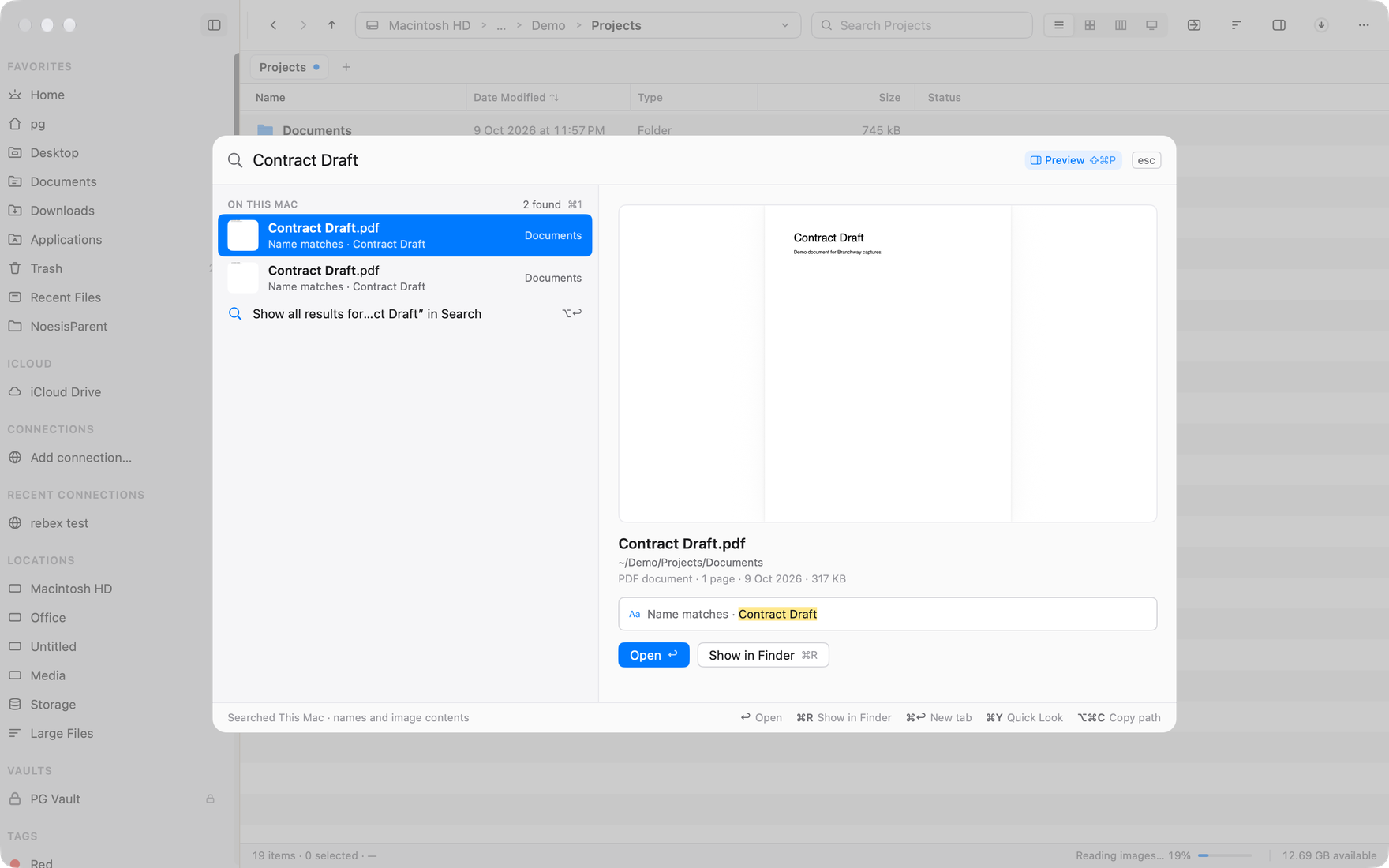
The short answer: the best file manager for Mac in 2027, in our view, is Branchway. It finds a file from a plain sentence, keeps its own index of every drive, external ones included, shows what fills each disk, and works in two or more panes with tabs and a keymap you choose. It runs on Apple silicon and Intel Macs with macOS 14 or later, and it is one payment with a 14-day free trial. For heavy server work, pick ForkLift. For a free two-panel app, pick Commander One.
Branchway is ours, and we say so up front. The rest of the list is the apps we would point a friend to, each for a different kind of work.
Last updated 13 November 2026. Prices and versions were checked on each maker’s own site on 3 November 2026. We keep this guide current through 2027 and update it when prices, versions or requirements change.
What should a Mac file manager do in 2027?
A file manager earns its place when it saves you time every day, not when it has the longest feature list. These are the things we think matter for the year ahead.
Search that understands what you mean
You remember a file as “the PDF from last week” or “that photo of the whiteboard”, not as a file name. A good file manager should take a plain sentence and turn it into filters, and find photos by what they show. If it uses AI for this, the work should happen on your Mac, so your files and searches stay there.
Every drive, not just the startup disk
External drives, USB sticks and drives formatted on a PC hold a lot of what people look for. Search should cover them without waiting on Spotlight, and a drive formatted as NTFS should be something you can write to, not only read.
Cloud folders and remote servers
iCloud Drive, OneDrive and Dropbox folders should show what is on the Mac and what is in the cloud, and opening a folder should not download every file in it. If you work with servers, SFTP and cloud storage such as S3 should open like folders, with progress for each transfer.
Where your space went
Finder will not tell you which folders fill a disk. A file manager should, with a map or a list of the biggest files, and it should never delete anything until you confirm.
Two panes, tabs and a keyboard that fits your hands
Moving files is easier when the source and the destination are on screen together. Tabs keep a working set of folders open. People coming from Windows or Total Commander should be able to use the keys they already know.
Safety
Undo should cover moves, renames and copies. Copies should queue, pause and resume, name clashes should ask what to do, and a move to another drive should check the copy before it removes the original.
The Macs you actually own
Plenty of people still use an Intel Mac, and not everyone runs the newest macOS. Check the minimum macOS and whether the app runs on Intel before you fall for it.
How we judged the apps
We started from that list and asked the same questions of each app:
- Finding files. Does it have its own search or index, and does it work on external drives?
- Daily work. Panes, tabs, keyboard control, batch rename, folder compare.
- Storage. Can it show what fills a disk?
- Remote and cloud. Which servers and cloud services does it reach?
- Safety. Undo, a transfer queue, checks on moves.
- Fit on the Mac. Is it a native Mac app, which macOS does it need, and does it run on Intel?
- Price. Paid once or by the period, what a licence covers, and whether there is a free tier or a trial.
Prices, versions and requirements come from each maker’s own site on the check date. Where a maker does not state something, we leave it out or say so, rather than guess. We did not run speed tests, so there are no benchmarks here, and there are no ratings or scores. Ranking is our judgement, and we make the app at number one, so weigh it accordingly and try the others too.
The best file managers for Mac, ranked
1. Branchway: best overall
Branchway is a native Mac file manager, built with AppKit, that puts finding files and seeing your drives at the centre. The current version is 1.0.4.
Search by sentence. Press ⌘K and type “pdfs over 1 mb from last week”. Branchway turns that into kind, size and date filters. Results come from its own index of file names on every volume, external drives included, so they arrive as you type, with Spotlight merged in when it is on. A misspelt name still finds the file, and a wide palette shows a preview of the result beside the list.
Photos and documents by what is in them. Turn it on in Settings and Branchway reads the words in documents and what pictures show, on your Mac, including scanned PDFs (by text recognition on the Mac), old Word .doc files, and Chinese, Japanese and Korean text. When a search turns up pictures, films and documents together, the results can show as tiles with previews. With the optional Smart search model, on Apple silicon with macOS 15 or later, a sentence also finds a document by what it is about or the moment in a video that matches. The model is a one-time download, and after that it runs on your Mac. More in how to search files by what is in them.

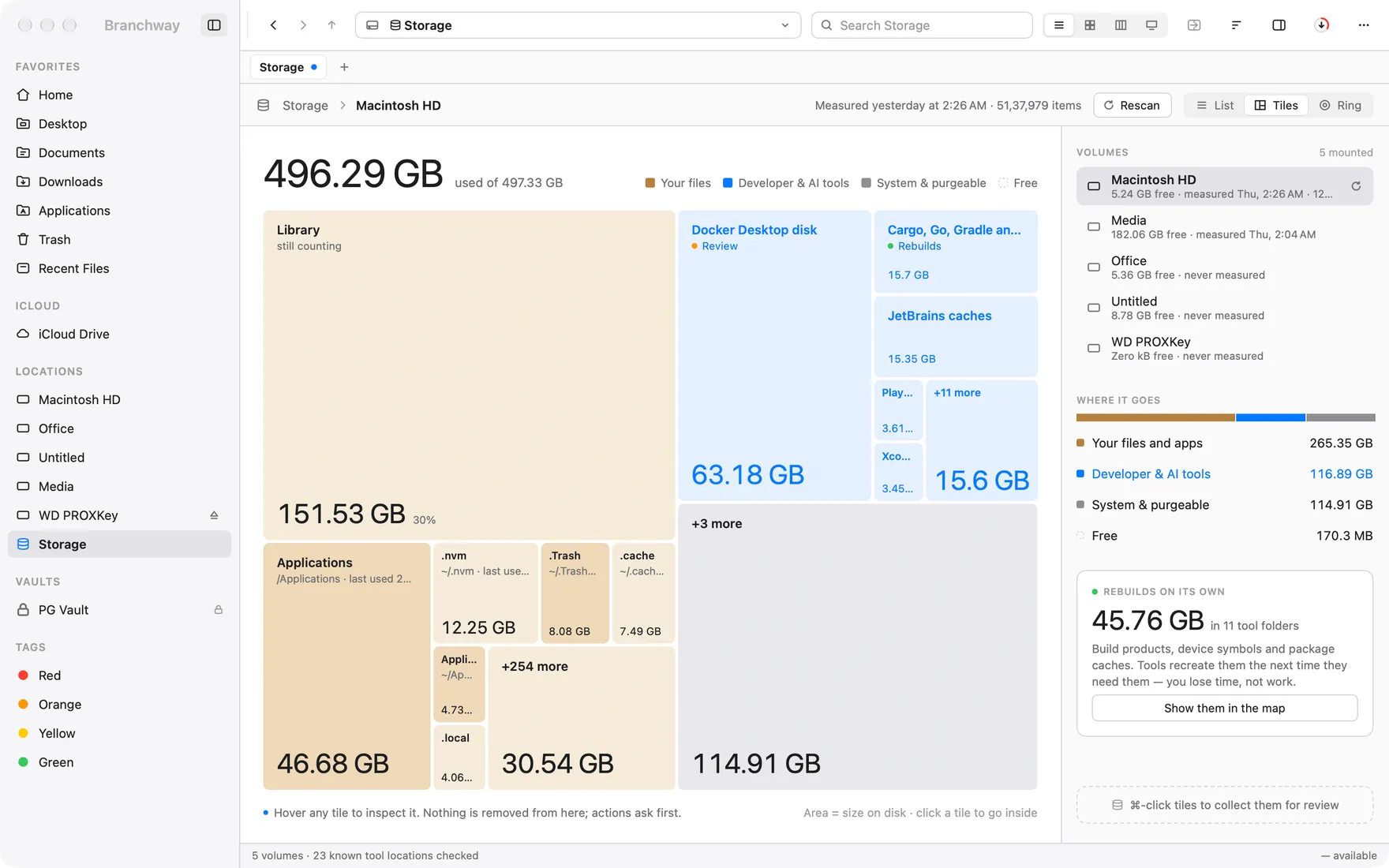
Every drive, mapped. Storage draws a map of each drive, coloured by kind of file, and Large Files lists the biggest files first with a review tray, so nothing is removed until you say so. See what is taking up space on your Mac.
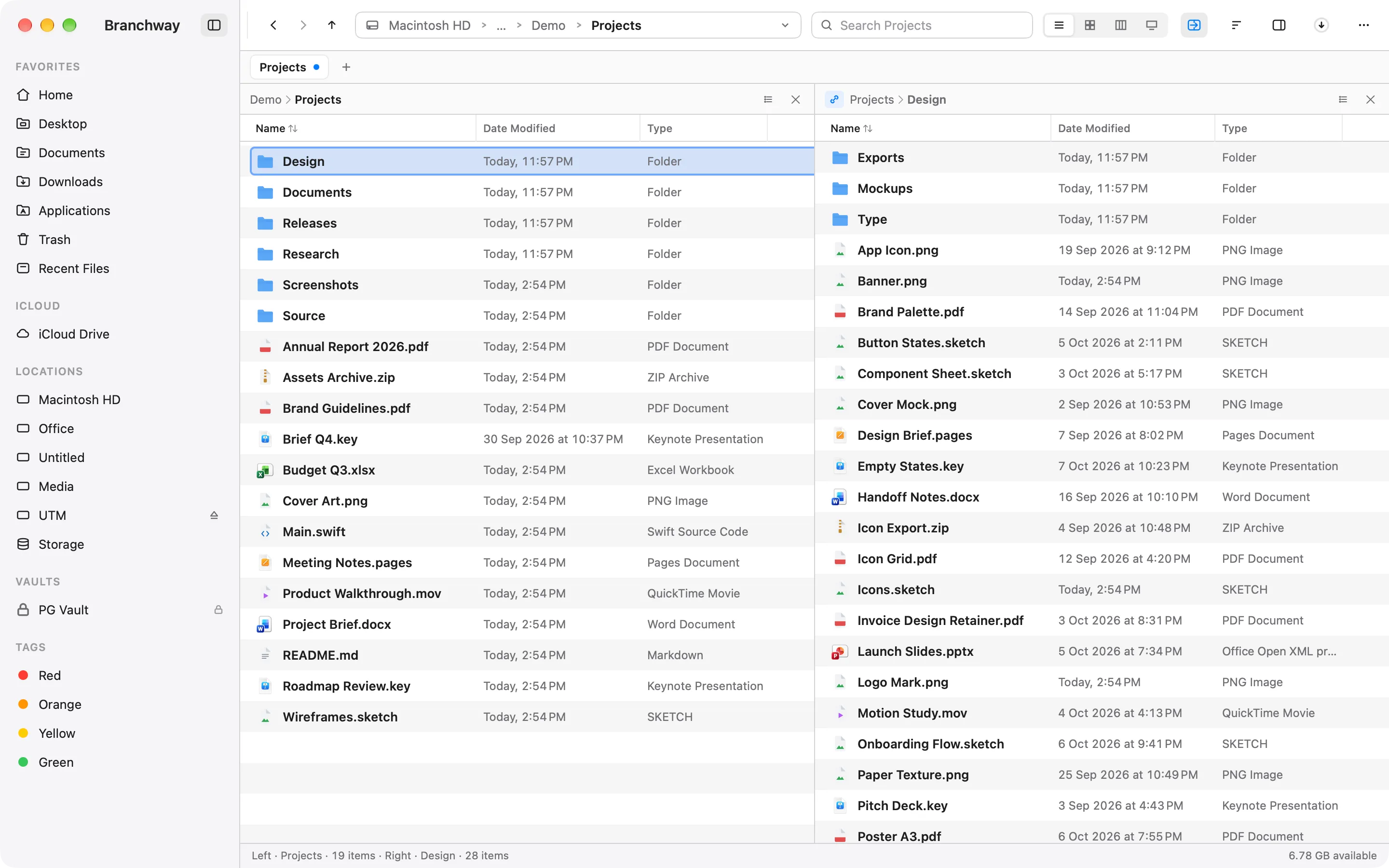
Panes, tabs and keymaps. Press ⌥⌘2 for two panes, or split again for up to four in a tab, each with its own path and history. Sync Browsing lets one pane follow the other. Pick the Windows keymap, or the Commander keymap where F5 copies and F6 moves to the other pane. More in how to get a dual-pane file manager on a Mac.
Cloud, servers and Windows drives. iCloud Drive, OneDrive, Google Drive and Dropbox folders show their status without downloading files you only browse. File › Connect to Server opens SMB and WebDAV shares, keeps saved ones in the sidebar and reconnects them after sleep, and an Activity Log says why a copy or connection failed. A share has no Trash, so deleting there asks first, and Copy Path works on shares and cloud folders too. SFTP servers and S3 and Azure storage open as folders, with progress for every transfer. Branchway NTFS, a separate free extension that is still in beta, lets you read and write NTFS drives once you turn it on in Settings.
Safety. Undo and Redo say what they will do, and the journal is kept. Copies and moves wait their turn in a queue you can pause, resume or cancel. Name clashes ask Replace, Keep Both or Skip. A move to another drive checks that everything arrived at full size before it removes the original.
The rest. Workspaces that gather a project from folders anywhere, a duplicate finder that compares content, folder compare with sync and two files side by side, batch rename, Group by kind in the list, Icons and Columns views, a preview pane beside the list, a Markdown viewer, the Shelf drop zone at the edge of the screen, encrypted vaults, zip, tar and 7z archives opened in place, Git status, a Trash that shows hidden items, themes, and 16 languages.
- Price: paid once per Mac. $19 at launch, regularly $29, with every 1.x update included. Licences for two and three Macs are available.
- Trial: 14 days with every feature, no account needed. After it, browsing, search and preview stay free; moving, renaming, deleting and creating files needs a licence.
- Needs: macOS 14 or later, on Apple silicon or Intel. Smart search needs Apple silicon and macOS 15 or later.
- What it does not have: a built-in terminal or hex editor. It opens the folder in your terminal app instead.
- Best for: most people who have outgrown Finder, people coming from Windows, and anyone who wants search, storage, panes and remote folders in one native app.
Try Branchway free for 14 days.
2. ForkLift 4: best for servers and sync
ForkLift from BinaryNights is a dual-pane file manager and a file transfer client in one app. It connects to SFTP, FTP, WebDAV, SMB, AFP and NFS, and to Amazon S3, Backblaze B2, Google Drive, OneDrive, Dropbox and Rackspace Cloud Files, and it syncs folders.
- Price: a licence you keep, with a period of updates. Single user $19.95 with one year of updates or $34.95 with two; family $29.95 or $49.95. After the update period, you keep the last version your licence covers.
- Needs: macOS 14.6 or later. Version 4.7.7 came out on 20 October 2026.
- Best for: people who move files to and from servers and cloud storage all day.
3. Commander One: best free two-panel app
Commander One from Electronic Team is a classic two-panel file manager with tabs, an operations queue and regular-expression search. The free version is on the Mac App Store. The PRO Pack adds server and cloud connections, more archive formats and phones mounted as drives.
- Price: free on the Mac App Store, PRO $29.99 paid once. A team licence for five Macs is $99.99.
- Needs: macOS 10.13 or later, so it also suits older Macs. Version 3.18 came out on 25 September 2026.
- Best for: a free two-panel app, or a Mac still on an older macOS.
4. QSpace Pro: best for many folders at a small price
QSpace Pro shows two, three or four folders in one window. Server connections, an enhanced archiver, advanced batch rename and a stash shelf are small paid extensions.
- Price: paid once. $29.99 regular, $13.99 on sale when we checked, with a 30-day trial. The Mac App Store version is $12.99 with in-app extensions.
- Needs: macOS 10.15 or later.
- Best for: people who want a grid of folders on screen and do not mind adding pieces as they need them.
5. Path Finder: best for long-time Path Finder users
Path Finder from Cocoatech is one of the oldest Finder alternatives, now at version 26, with dual pane, tabs, folder compare, a built-in terminal and the Drop Stack shelf. TidBITS reported version 26.1.6 in July 2026.
- Price: time-limited. TidBITS lists a $29.95 yearly subscription that renews, and licences for one year at $32.95, two years at $55.95 and five years at $122.95. Cocoatech’s own site did not load for us on the check date, so confirm on its store.
- Best for: people who already rely on its many modules and are happy to pay by the period. If you would rather pay once, read Path Finder alternatives for Mac.
6. Bloom: best for Finder’s look with more panes
Bloom calls itself Finder, refined. It adds multi-pane layouts, Sync Browsing, archive viewing, cloud folders, folder scans and configurable shortcuts, and it is updated often: version 1.5.47 came out on 31 October 2026.
- Price: $16, paid once, with a 7-day trial.
- Best for: people who like how Finder looks and want more panes for little money.
7. Tilde: best for organising project folders
Tilde is a newer file manager with split views, each pane with its own tabs, a command palette, custom properties you can filter, group and sort by, saved layouts, bulk rename and undo for moves, renames and copies.
- Price: $29.99 paid once, with one year of updates and use on two Macs. 7-day trial, no card needed.
- Needs: an Apple silicon Mac with macOS 14 or later. Intel Macs are not supported.
- Best for: people who want to tag and sort files with their own fields.
8. FileOctopus: best free tier that feels like Finder
FileOctopus is a newer app built to feel like Finder, with Finder’s four views and shortcuts. The free tier has two panes per window, tabs, filename search, undo that lasts across relaunches, merge previews and Google Drive and Dropbox status. PRO adds more panes, content search, saved searches, a copy queue and folder compare in beta. The current version is 1.0.9.
- Price: free, or PRO paid once for up to two Macs: $29.99 list, with launch prices until 30 November 2026. PRO is free for 14 days.
- Needs: an Apple silicon Mac with macOS 15 or later.
- Best for: people who want Finder’s feel with a few safety features, for free.
9. Nimble Commander: best free and open source
Nimble Commander is a free, open-source two-panel file manager in the Norton Commander tradition, with keyboard shortcuts for more than a hundred actions, FTP, SFTP and WebDAV, a built-in terminal and a text and hex viewer. Version 1.9.0 came out on 1 November 2026 and dropped support for macOS 11 Big Sur.
- Price: free.
- Best for: keyboard users who want a classic layout and open source.
10. Marta: best for people who configure with code
Marta is a free file manager written in Swift, with a configuration language, themes, Lua plugins and archives opened like folders. It is labelled beta, and the latest version on its site is 0.8.2.
- Price: free. Needs: macOS 11 or later.
- Best for: people who like to script and theme their tools.
How do the best Mac file managers compare?
| App | Best for | Price | Free tier or trial | Needs | Intel Macs |
|---|---|---|---|---|---|
| Branchway | Best overall | $19 once (launch), $29 regular | 14-day trial; browse, search and preview free after | macOS 14+ | Yes |
| ForkLift 4 | Servers and sync | $19.95 with 1 year of updates | Free trial | macOS 14.6+ | See site |
| Commander One | Free two-panel | Free, PRO $29.99 once | Free version | macOS 10.13+ | Yes |
| QSpace Pro | Many folders, low price | $29.99 once regular | 30-day trial | macOS 10.15+ | See site |
| Path Finder 26 | Path Finder regulars | From $29.95 a year | See site | See site | See site |
| Bloom | Finder look, more panes | $16 once | 7-day trial | See site | See site |
| Tilde | Organising projects | $29.99 once, 1 year of updates | 7-day trial | macOS 14+ | No |
| FileOctopus | Free, Finder feel | Free, PRO $29.99 once | Free tier; PRO 14-day trial | macOS 15+ | No |
| Nimble Commander | Free and open source | Free | Free | See site | See site |
| Marta | Configure with code | Free (beta) | Free | macOS 11+ | See site |
“See site” means the maker’s own pages did not state it when we checked.
Which one should you choose?
Start from what slows you down today.
- You lose files, run out of space or work across several drives: Branchway.
- You came from Windows and miss File Explorer or Total Commander: Branchway, with the Windows or Commander keymap. Our pick of Finder alternatives has a section on this.
- You move files to servers all day: ForkLift.
- You want free: Commander One, FileOctopus, Nimble Commander or Marta.
- You want many folders on screen for little money: QSpace Pro or Bloom.
- You use an Intel Mac: Branchway or Commander One.
Nearly every app here has a trial or a free tier, so use one for a week on real work before you pay. To see how Branchway sits next to Finder, read Branchway and Finder, or go to the Branchway page for the tour and a 14-day free trial.
Questions people ask
What is the best file manager for Mac in 2027?
Our pick is Branchway. It finds files from a plain sentence, keeps its own index of every drive including external ones, maps what fills each disk, works in two or more panes with tabs, and runs on Apple silicon and Intel Macs with macOS 14 or later. It is a one-time purchase with a 14-day free trial. ForkLift is the pick for heavy server work, and Commander One for a free two-panel app.
Is there a good free file manager for Mac?
Yes. Commander One has a free version on the Mac App Store, FileOctopus has a free tier with two panes per window, Nimble Commander is free and open source, and Marta is free and still labelled beta. After Branchway's 14-day trial, browsing, search and preview stay free.
Which Mac file managers still run on Intel Macs?
Branchway runs natively on Apple silicon and Intel with macOS 14 or later, and Commander One supports macOS 10.13 or later. Tilde and FileOctopus need an Apple silicon Mac. For the others, check the maker's site before you buy.
Can a Mac file manager find files when Spotlight is off?
Branchway can. It keeps its own index of file names on every volume, external drives included, and merges in Spotlight when it is on. It can also read the words in documents and what photos show, on your Mac, if you turn that on in Settings.
Which Mac file manager can write to NTFS drives?
Branchway reads and writes NTFS drives through Branchway NTFS, a separate free extension that is still in beta and is turned on in Settings. Without a tool like this, macOS only reads NTFS drives.
Are Mac file managers a subscription?
Most are not. Branchway, Commander One PRO, QSpace Pro, Bloom, Tilde and FileOctopus PRO are paid once. ForkLift and Tilde include a set period of updates with a licence you keep. Path Finder is sold as a time-limited licence or a yearly subscription.
Does a file manager replace Finder?
Finder is part of macOS and stays on your Mac, so a file manager runs beside it. Branchway can be set as the default file viewer, so Show in Finder from other apps opens in Branchway, and Reveal in Finder (⌥⌘R) takes you back whenever you want.